

How we picked
- Image ➜ Video quality: realism, motion coherence, camera control.
- Built-in image tools: native text-to-image / image editing (or tightly integrated).
- Speed & reliability: production viability today.
- Ecosystem: templates, controls, guardrails, export, API.
2025 industry snapshot (what changed this year)
- Consumer video models went mainstream. A major mobile launch pushed AI-video in front of millions, with rapid adoption and lively IP debates—clear signs that AI-video is both accessible and contested.
- Image→Video is diversifying. Beyond generic “photo dancing,” we’re seeing sports moves, dance choreography, and highlight templates you can drop a single image into (great for social content).
- Model access via creative suites. Tools like Runway (Gen-3/4) and CapCut Dreamina blend image generation/editing with image-to-video inside one workflow—less tool-hopping for creators.
- APIs expose top models. Frontier engines like Kling 2.5 Turbo are reachable via hosted endpoints, letting teams build custom UIs while keeping best-in-class motion.
The list
1) DeeVid AI
Why it stands out: A practical Image to Video AI workflow paired with an AI Image Generator & Editor inside the same platform. Web and mobile apps make it accessible for non-experts; good for fast “upload a photo → animated short” pipelines.
Best for: Marketers and indie teams that want one place to generate/edit images and animate them into short videos.
2) Runway (Gen-3)
Why it stands out: A polished creative suite with Text-to-Image, Image-to-Video, camera controls, motion brush, and production-ready exports. Gen-3 was trained on images and video, so single-image motion tends to feel cinematic with good editability.
Best for: Designers/teams who want an all-in-one studio feel and finer control (structure, style, motion).
3) CapCut Dreamina
Why it stands out: Free-friendly entry point that combines AI image generator and image-to-video in one place, with handy enhancers (frame interpolation, upscale, soundtrack). Great for fast social clips and marketing.
Best for: Creators who want speed, ease, and a zero-learning-curve toolchain.
4) Luma Dream Machine
Why it stands out: Strong cinematic feel and a straightforward image-to-video flow available on web and iOS. Good motion realism and shareability.
Best for: Quick ideation, concept reels, and storytelling from a single still.
5) Pika
Why it stands out: Purpose-built for “idea-to-video” with image-to-video support and active iteration. A solid choice for stylized motion from stills. (Developers can also hit hosted endpoints.)
Best for: Social creators and teams that value rapid variations and playful styles.
6) Kling 2.5 Turbo (via API)
Why it stands out: Known for fluid motion and prompt precision; the Turbo tier shortens turnaround and cost—useful when you need lots of short product or promo clips from stills. Access is typically via platforms like FAL or other hosted services.
Best for: Dev-savvy teams wanting cutting-edge motion through an API.
7) HeyGen
Why it stands out: While best known for avatars, HeyGen’s image-to-video flows can animate a single photo (talking head) and now live inside a broader “AI Video Generator” that accepts images as inputs—handy for business narration and explainers.
Best for: Training, onboarding, and voice-over-driven content from brand photos.
8) Leonardo.Ai
Why it stands out: A strong image generator with growing AI video (Motion) features—so you can concept art, refine frames, and animate within one ecosystem.
Best for: Artists who start with image ideation and want light-to-medium animation without leaving the tool.
9) PixVerse
Why it stands out: Popular with mobile creators; supports text & photo ➜ video with a continually updated model. It’s fast to get stylized animations from selfies or character shots.
Best for: Quick, stylized social animations from portraits or character art.
10) Viggle
Why it stands out: A template-driven image-to-video (dance, sports, meme) engine—drop in a photo and get motion-captured highlights or choreography. It’s less about freeform cinematography, more about instant “put me in the action” results.
Best for: Viral social content—sports moments, dance trends, memes.
Honorable mentions & ecosystem shifts
- Midjourney Video (new): Animates images with short motion clips; early but promising for MJ-native workflows.
- Seedream 4.0 (Bytedance): Primarily an image model—fast, high-fidelity generation and editing in one architecture. Useful upstream of image-to-video (create better source frames before animating).
Quick comparison (snapshot)
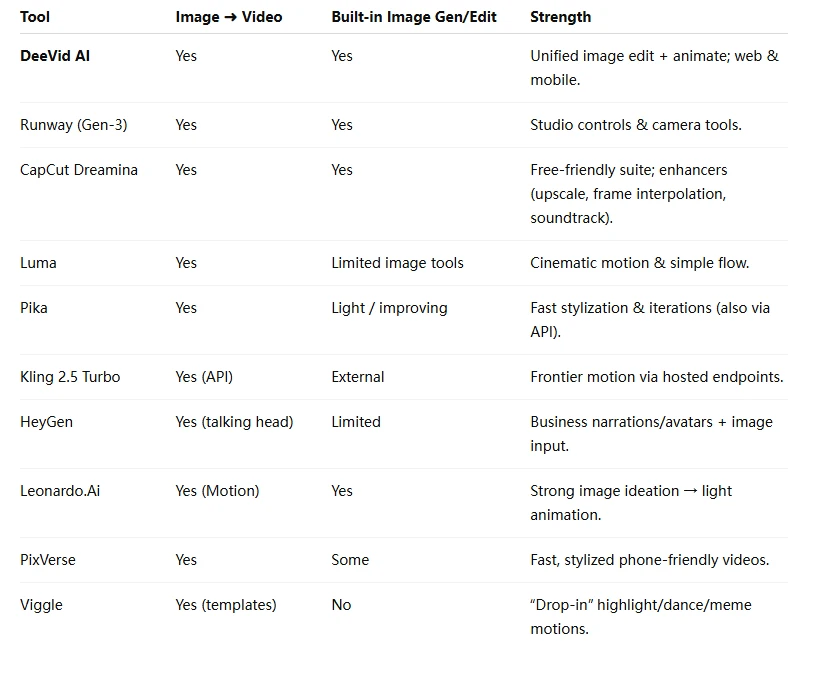
Which to choose (by use case)
- Marketing/product shots: Kling 2.5 Turbo (API-level motion quality) or Runway for creative control; CapCut Dreamina for speed and polish.
- Talking-head from a single photo: HeyGen (enterprise-ready) or DeeVid AI for a simpler, all-in-one flow.
- Stylized social clips: PixVerse or Pika.
- Artist workflows (concept → animate): Leonardo.Ai (image first), then animate; or pair Seedream 4.0 for pristine source frames before animating elsewhere.
- Plug-and-play memes/dance/sports: Viggle templates.
Pro tips for better Image-to-Video results
- Prep the source image. Use an image editor/upscaler before animating—sharper inputs reduce distortion on motion. Suites like Runway/Dreamina/DeeVid include this step.
- Constrain motion. Start with a clear camera note (“handheld medium push-in; subject stays center”) and short durations (3–5s); iterate up.
- Leverage templates wisely. For sports/dance/highlights, templated moves (Viggle) often beat freeform prompting—fewer artifacts, faster wins.
- Mind rights & likeness. The market’s heating up; keep an eye on platform policies and IP/likeness controls as tools scale.









Sign in to leave a comment.